# Student Measurements

## Step 1

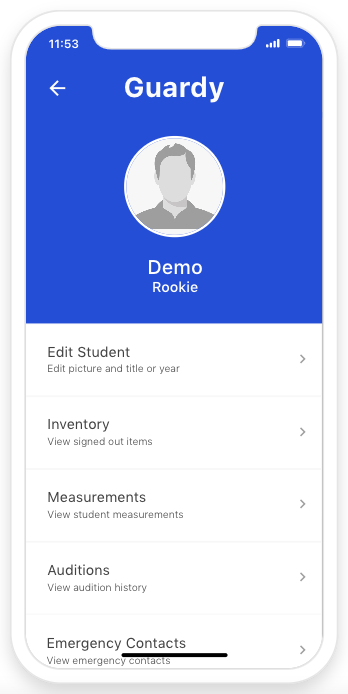
In the students profile main menu you will want to click on Measurements

<div align="left"><figure><img src="https://4175712474-files.gitbook.io/~/files/v0/b/gitbook-x-prod.appspot.com/o/spaces%2FhPsk0uM1YeF90QV1USxb%2Fuploads%2FYVbgSi2pAkGymhCsRDBc%2FScreen%20Shot%202023-04-30%20at%2011.54.00%20AM.png?alt=media&#x26;token=e27cf010-d7c8-4b53-b516-4f379a3b647d" alt=""><figcaption></figcaption></figure></div>

## Step 2

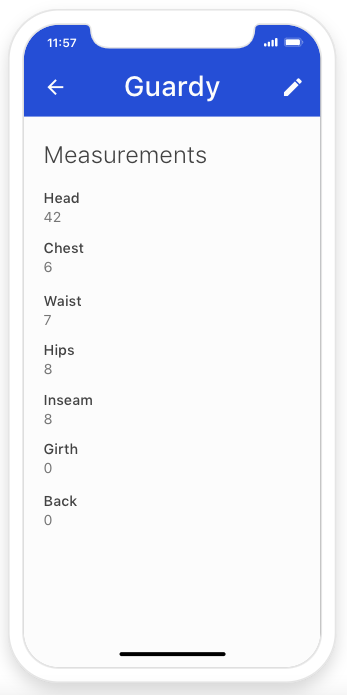
You can view the current measurements that are logged.

<div align="left"><figure><img src="https://4175712474-files.gitbook.io/~/files/v0/b/gitbook-x-prod.appspot.com/o/spaces%2FhPsk0uM1YeF90QV1USxb%2Fuploads%2FPZcvIbn9X4n364Cm1Al8%2FScreen%20Shot%202023-04-30%20at%2011.57.48%20AM.png?alt=media&#x26;token=31e5b63f-49f5-4811-8c7c-8f095d43210e" alt=""><figcaption></figcaption></figure></div>

## To Edit Measurements

## Step 1

Click on the edit icon located on the top right hand side of the screen.&#x20;

<div align="left"><figure><img src="https://4175712474-files.gitbook.io/~/files/v0/b/gitbook-x-prod.appspot.com/o/spaces%2FhPsk0uM1YeF90QV1USxb%2Fuploads%2FPZcvIbn9X4n364Cm1Al8%2FScreen%20Shot%202023-04-30%20at%2011.57.48%20AM.png?alt=media&#x26;token=31e5b63f-49f5-4811-8c7c-8f095d43210e" alt=""><figcaption></figcaption></figure></div>

## Step 2

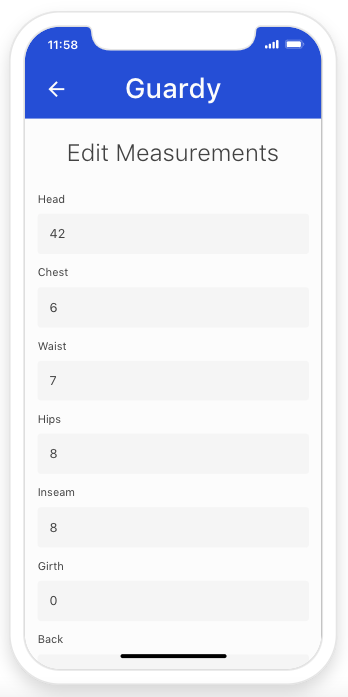
Update the form and then click on done.&#x20;

<div align="left"><figure><img src="https://4175712474-files.gitbook.io/~/files/v0/b/gitbook-x-prod.appspot.com/o/spaces%2FhPsk0uM1YeF90QV1USxb%2Fuploads%2FhPFoJ9dASMlLAx4GWvnD%2FScreen%20Shot%202023-04-30%20at%2011.58.48%20AM.png?alt=media&#x26;token=9719dc54-345d-4a8c-b01a-1e142b0e1698" alt=""><figcaption></figcaption></figure></div>