# Add a Student

## Step 1

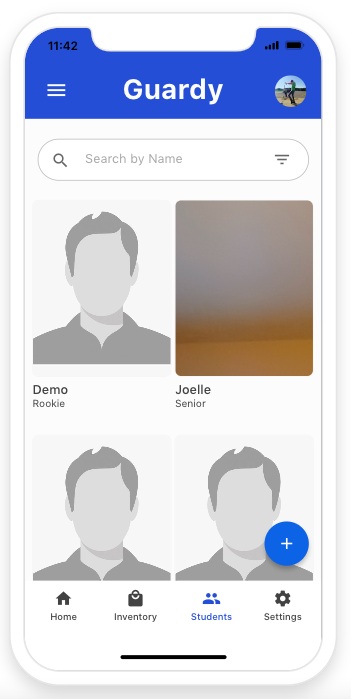
You will want to click on the blue plus button located on the bottom right side of the screen.&#x20;

<div align="left"><figure><img src="https://4175712474-files.gitbook.io/~/files/v0/b/gitbook-x-prod.appspot.com/o/spaces%2FhPsk0uM1YeF90QV1USxb%2Fuploads%2FGNV6zzgmUw5xLHdfdi3O%2FScreen%20Shot%202023-04-30%20at%2011.42.10%20AM.png?alt=media&#x26;token=a7e73a38-a596-46fc-b0d0-733ac759d99a" alt=""><figcaption></figcaption></figure></div>

## Step 2

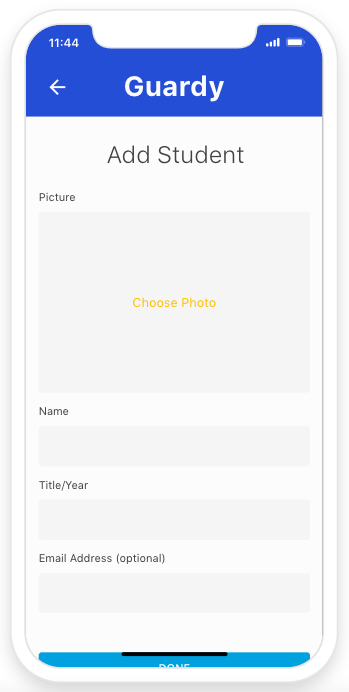
You will want to fill out the from. Now all fields are required. On you're done click on done to save the student to your database.&#x20;

<div align="left"><figure><img src="https://4175712474-files.gitbook.io/~/files/v0/b/gitbook-x-prod.appspot.com/o/spaces%2FhPsk0uM1YeF90QV1USxb%2Fuploads%2FfetIbaQN3B88f8AFHaTJ%2FScreen%20Shot%202023-04-30%20at%2011.44.25%20AM.png?alt=media&#x26;token=3ebbddf6-0202-43c1-a167-ec8ee668a4f5" alt=""><figcaption></figcaption></figure></div>