# Student Measurements

## Step 1

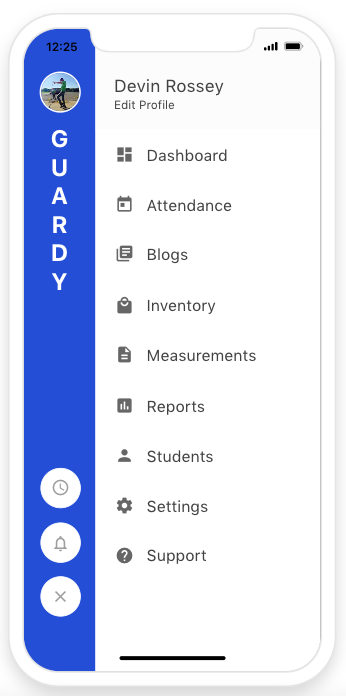
Click on the main menu and click on reports

<div align="left"><figure><img src="https://4175712474-files.gitbook.io/~/files/v0/b/gitbook-x-prod.appspot.com/o/spaces%2FhPsk0uM1YeF90QV1USxb%2Fuploads%2F4olpnIWZ9VivOMSloiOY%2FScreen%20Shot%202023-04-30%20at%2012.25.39%20PM.png?alt=media&#x26;token=e3afbcb0-f4dd-469b-8172-c0cfbc061d71" alt=""><figcaption></figcaption></figure></div>

## Step 2

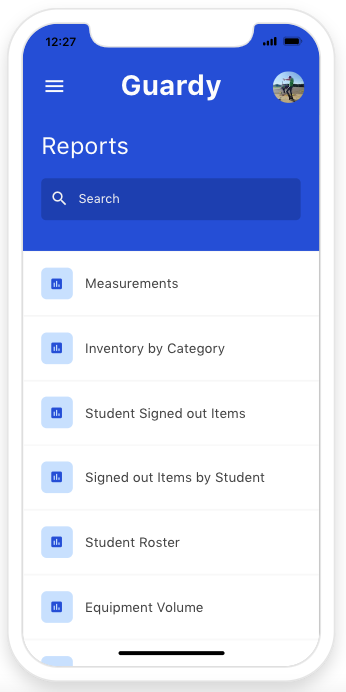
Click on  Measurements

<div align="left"><figure><img src="https://4175712474-files.gitbook.io/~/files/v0/b/gitbook-x-prod.appspot.com/o/spaces%2FhPsk0uM1YeF90QV1USxb%2Fuploads%2FMuh9JOX7OgRofnzKMNy7%2FScreen%20Shot%202023-04-30%20at%2012.27.14%20PM.png?alt=media&#x26;token=08f6ffdc-1c59-40f6-a228-97bf6e53406a" alt=""><figcaption></figcaption></figure></div>

## Step 3

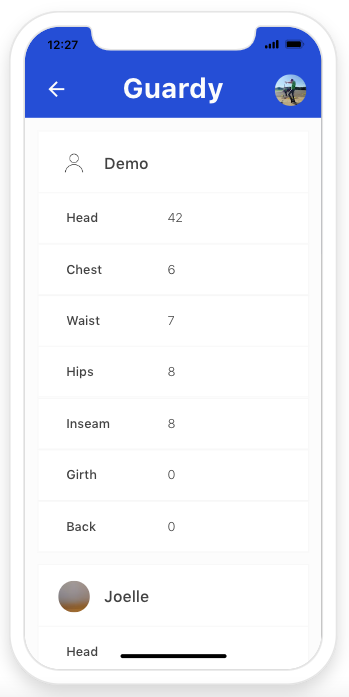
Now you can see a list of all your students in one place and all their measurements. This helps when ordering on the computer and you want to view all their measurements in one place.&#x20;

<div align="left"><figure><img src="https://4175712474-files.gitbook.io/~/files/v0/b/gitbook-x-prod.appspot.com/o/spaces%2FhPsk0uM1YeF90QV1USxb%2Fuploads%2F1An03jUqf1xebmGmSjMx%2FScreen%20Shot%202023-04-30%20at%2012.27.29%20PM.png?alt=media&#x26;token=71596977-584c-4b06-ad8d-232bc4c2b65d" alt=""><figcaption></figcaption></figure></div>