# Inventory Analytics

## Step: 1

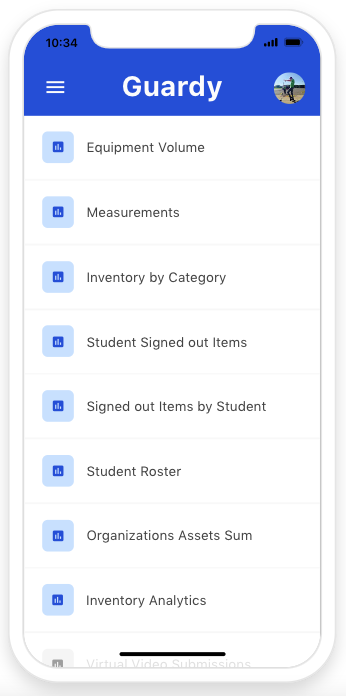
From the reports section you will want to find the Inventory analytics report and then click it.&#x20;

<div align="left"><figure><img src="https://4175712474-files.gitbook.io/~/files/v0/b/gitbook-x-prod.appspot.com/o/spaces%2FhPsk0uM1YeF90QV1USxb%2Fuploads%2F4LdQ9IgVT4aImLyiBIiI%2FScreen%20Shot%202023-06-05%20at%2010.34.48%20AM.png?alt=media&#x26;token=b8306a8d-080f-41de-a8b1-a847350858dd" alt=""><figcaption></figcaption></figure></div>

## Step 2:&#x20;

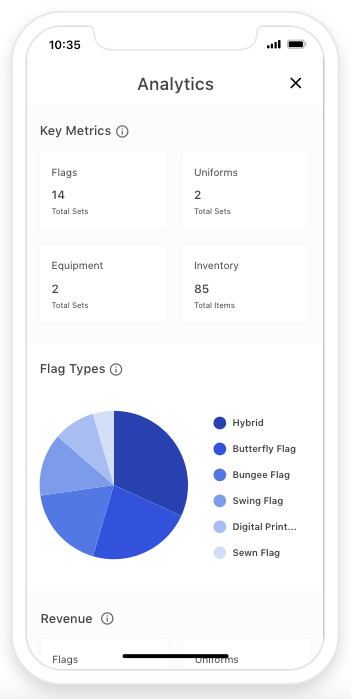
Then you will be able to review your inventory details as an overview. These gives you a lot of details such as key metrics, revenue and more.&#x20;

<div align="left"><figure><img src="https://4175712474-files.gitbook.io/~/files/v0/b/gitbook-x-prod.appspot.com/o/spaces%2FhPsk0uM1YeF90QV1USxb%2Fuploads%2Fa6iBrzjzWmFkW89Kv3aj%2FScreen%20Shot%202023-06-05%20at%2010.35.45%20AM.png?alt=media&#x26;token=e0c4d34d-73c0-489b-b8ff-083616d92681" alt=""><figcaption></figcaption></figure></div>