# Add Equipment

## Step 1

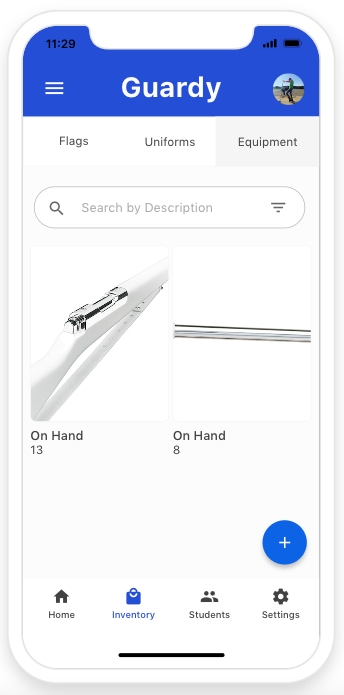
You will want to click on the inventory tab on the bottom navigation and then click on Equipment. Once you're on this page you will want to click on the blue plus button located on the bottom right hand side of the screen.

<div align="left"><figure><img src="https://4175712474-files.gitbook.io/~/files/v0/b/gitbook-x-prod.appspot.com/o/spaces%2FhPsk0uM1YeF90QV1USxb%2Fuploads%2FzEBFCplXIM78PTFMbo6t%2FScreen%20Shot%202023-04-30%20at%2011.29.33%20AM.png?alt=media&#x26;token=4a1a6cd3-e335-4097-86ca-b36af04e2dfd" alt=""><figcaption></figcaption></figure></div>

## Step 2

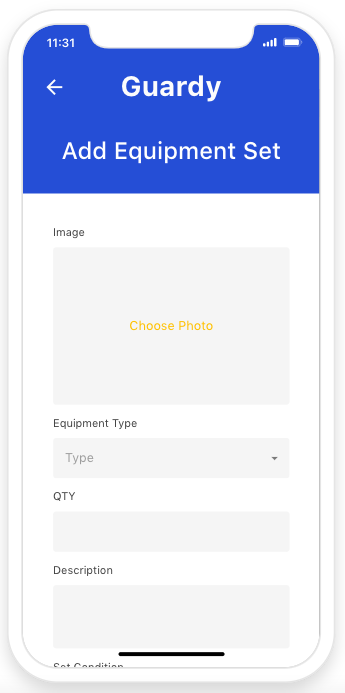
Now you will want to fill out the form and then click done.&#x20;

<div align="left"><figure><img src="https://4175712474-files.gitbook.io/~/files/v0/b/gitbook-x-prod.appspot.com/o/spaces%2FhPsk0uM1YeF90QV1USxb%2Fuploads%2F1UphQSJuLN7GWyE1ei4Q%2FScreen%20Shot%202023-04-30%20at%2011.31.12%20AM.png?alt=media&#x26;token=8843b2f4-c624-4e1f-a671-1f9dad5b23b1" alt=""><figcaption></figcaption></figure></div>