# Add a Uniform

## Step 1

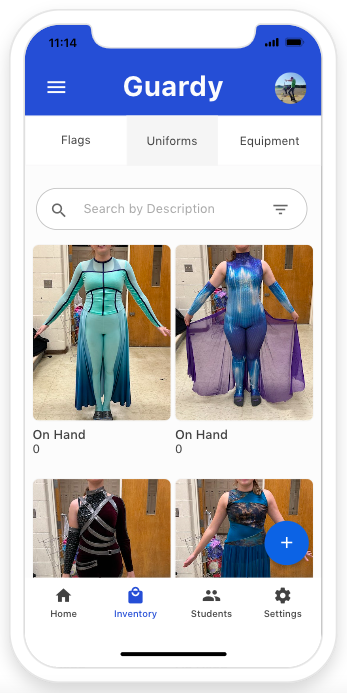
You will want to click on the plus button located on the bottom right hand side of the screen.

<div align="left"><figure><img src="https://4175712474-files.gitbook.io/~/files/v0/b/gitbook-x-prod.appspot.com/o/spaces%2FhPsk0uM1YeF90QV1USxb%2Fuploads%2FvGemr2twkEOAVfWRdck3%2FScreen%20Shot%202023-04-30%20at%2011.14.50%20AM.png?alt=media&#x26;token=e836f4c5-2825-4398-956d-c67ad0a50b63" alt=""><figcaption></figcaption></figure></div>

## Step 2

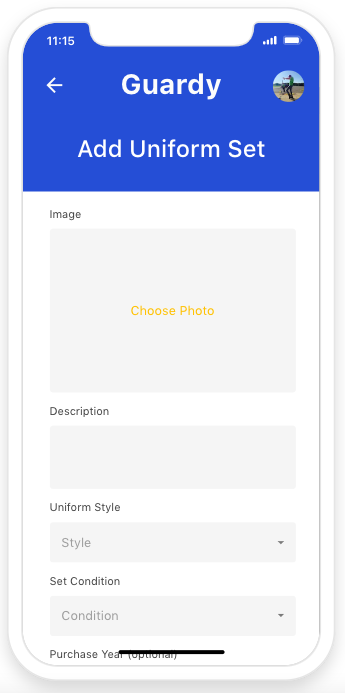
Now you will want to complete the form.&#x20;

{% hint style="info" %}
Keep in mind you will want to set the purchase vaule as the total amount the set would cost in total. We also made a new improvement where you can add each size and the system automatically calculates your quantity on hand.&#x20;
{% endhint %}

<div align="left"><figure><img src="https://4175712474-files.gitbook.io/~/files/v0/b/gitbook-x-prod.appspot.com/o/spaces%2FhPsk0uM1YeF90QV1USxb%2Fuploads%2F5VlVxzWjNTkYmxRJAwhv%2FScreen%20Shot%202023-04-30%20at%2011.15.45%20AM.png?alt=media&#x26;token=12ef359a-4457-4093-8a3d-c688877fc52a" alt=""><figcaption></figcaption></figure></div>

Once you have complete the form you item will be saved to the database.&#x20;