# Edit Profile

## Step 1

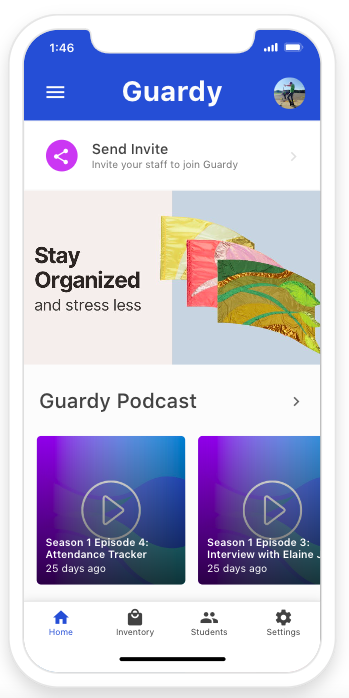
You will want to click on the settings tab on the bottom right hand side of the screen.&#x20;

<div align="left"><figure><img src="https://4175712474-files.gitbook.io/~/files/v0/b/gitbook-x-prod.appspot.com/o/spaces%2FhPsk0uM1YeF90QV1USxb%2Fuploads%2F0nXyOufEyUAzirIzIdio%2FScreen%20Shot%202023-05-20%20at%201.46.24%20PM.png?alt=media&#x26;token=68b6ad3b-4da3-4753-8d57-7614d4f28c6f" alt=""><figcaption></figcaption></figure></div>

## Step 2

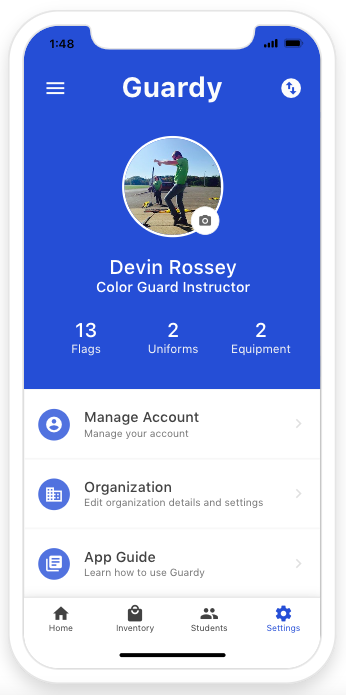
Click on Manage Account.

<div align="left"><figure><img src="https://4175712474-files.gitbook.io/~/files/v0/b/gitbook-x-prod.appspot.com/o/spaces%2FhPsk0uM1YeF90QV1USxb%2Fuploads%2Flh1vv9NeGh3JYuRbKsUa%2FScreen%20Shot%202023-05-20%20at%201.48.04%20PM.png?alt=media&#x26;token=430810a6-7427-47a7-9f85-1bd919c26971" alt=""><figcaption></figcaption></figure></div>

## Step 3

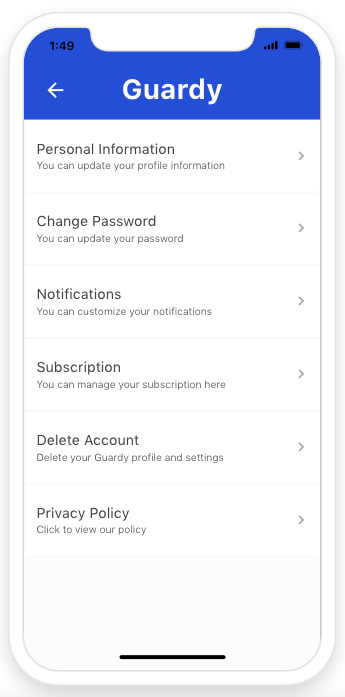
Now you will want to click on Personal Information&#x20;

<div align="left"><figure><img src="https://4175712474-files.gitbook.io/~/files/v0/b/gitbook-x-prod.appspot.com/o/spaces%2FhPsk0uM1YeF90QV1USxb%2Fuploads%2FVVcn2pEMBZTtsG3zpOJj%2FScreen%20Shot%202023-05-20%20at%201.49.46%20PM.png?alt=media&#x26;token=5cd8516b-96c9-40e7-ab90-2c28ec0fa1a2" alt=""><figcaption></figcaption></figure></div>

## Step 4

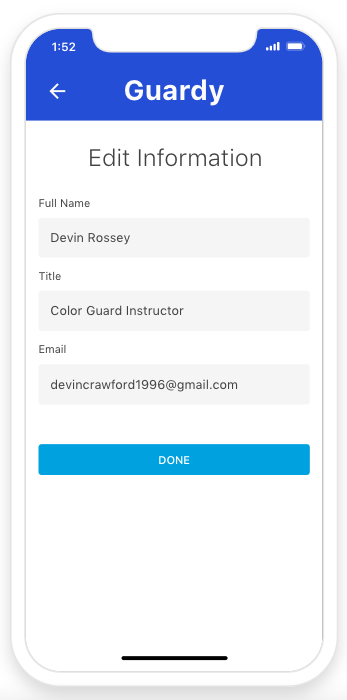
Now you can edit your information and then click done to save.&#x20;

<div align="left"><figure><img src="https://4175712474-files.gitbook.io/~/files/v0/b/gitbook-x-prod.appspot.com/o/spaces%2FhPsk0uM1YeF90QV1USxb%2Fuploads%2FFX4k6805xRwZz8fjlzpB%2FScreen%20Shot%202023-05-20%20at%201.52.54%20PM.png?alt=media&#x26;token=86c1ad84-98d4-4f22-9fc8-f0e44d89b83c" alt=""><figcaption></figcaption></figure></div>