# Delete Account

## Step 1

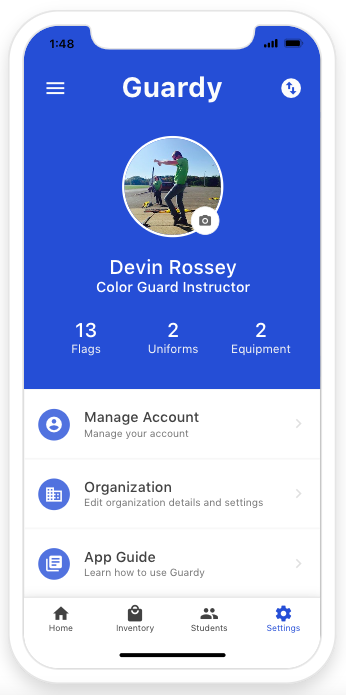
To Delete your account you will want to go to the settings area and click on Manage Account.

<div align="left"><figure><img src="https://4175712474-files.gitbook.io/~/files/v0/b/gitbook-x-prod.appspot.com/o/spaces%2FhPsk0uM1YeF90QV1USxb%2Fuploads%2Flh1vv9NeGh3JYuRbKsUa%2FScreen%20Shot%202023-05-20%20at%201.48.04%20PM.png?alt=media&#x26;token=430810a6-7427-47a7-9f85-1bd919c26971" alt=""><figcaption></figcaption></figure></div>

## Step 2

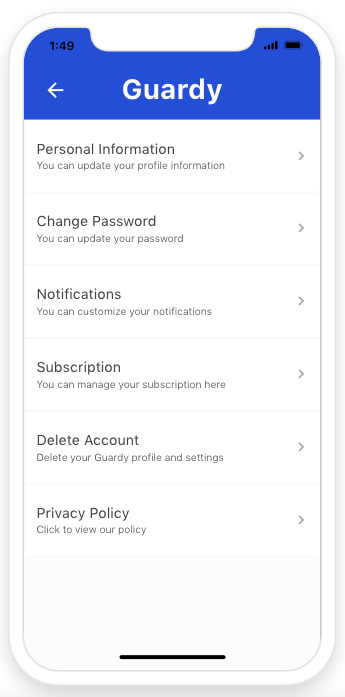
Now you will want to select Delete Account.

<div align="left"><figure><img src="https://4175712474-files.gitbook.io/~/files/v0/b/gitbook-x-prod.appspot.com/o/spaces%2FhPsk0uM1YeF90QV1USxb%2Fuploads%2FVVcn2pEMBZTtsG3zpOJj%2FScreen%20Shot%202023-05-20%20at%201.49.46%20PM.png?alt=media&#x26;token=5cd8516b-96c9-40e7-ab90-2c28ec0fa1a2" alt=""><figcaption></figcaption></figure></div>

## Step 3

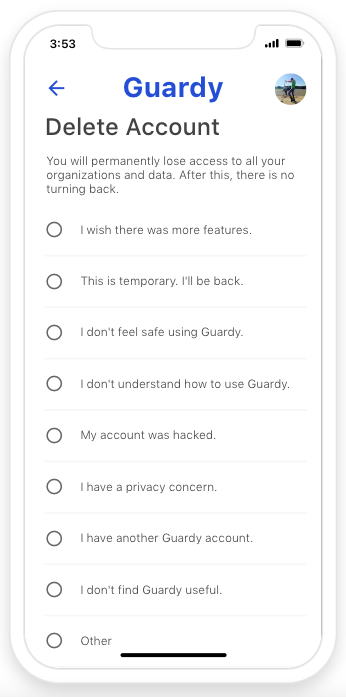
Now you will want to select your reason for wanting to delete your account.&#x20;

<div align="left"><figure><img src="https://4175712474-files.gitbook.io/~/files/v0/b/gitbook-x-prod.appspot.com/o/spaces%2FhPsk0uM1YeF90QV1USxb%2Fuploads%2F8E5UgyEjFZUIlKr3TQkd%2FScreen%20Shot%202023-05-20%20at%203.53.59%20PM.png?alt=media&#x26;token=ca9d467b-fce7-41b0-88dc-dd1f2bc0655c" alt=""><figcaption></figcaption></figure></div>

## Step 4

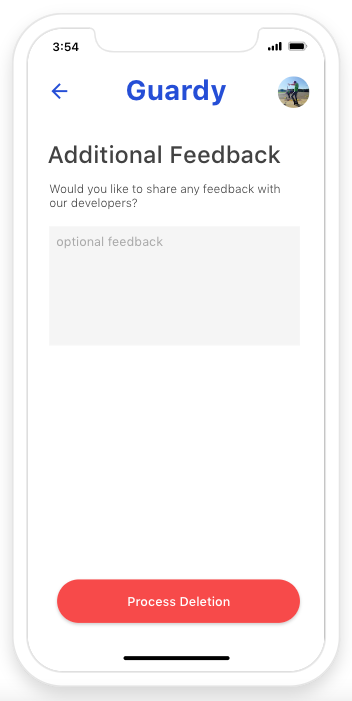
You will be asked if you want to submit any additional feedback to our develipment team. This is optional if you don't want to send any feedback then you will want to just click on process deletion.&#x20;

<div align="left"><figure><img src="https://4175712474-files.gitbook.io/~/files/v0/b/gitbook-x-prod.appspot.com/o/spaces%2FhPsk0uM1YeF90QV1USxb%2Fuploads%2FGV138JRYQy5x0qkeWmFs%2FScreen%20Shot%202023-05-20%20at%203.54.47%20PM.png?alt=media&#x26;token=7e41594c-7070-4df2-948f-f8a29cab833e" alt=""><figcaption></figcaption></figure></div>